The gingham pattern is a timeless textile design defined by its simple checkered grid of alternating coloured and white squares.
Did you know that you can create this pattern using CSS code?
Gingham CSS Code
background-image: linear-gradient(90deg,rgba(60,120,180,0.15) 50%,transparent 50%), linear-gradient(rgba(60, 120, 180, 0.15) 50%,transparent 50%);
background-size: 50px 50px;
How it works
This is two separate background layers, separated by a comma.
Each gradient paints a rectangular colour block (first 50%) and then a transparent block (second 50%). When you stack them and adjust background-size / background-position, you get a checkerboard or grid-like pattern.
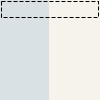
The first gradient is the horizontal (default) stripes rotated 90 degrees to form vertical stripes.
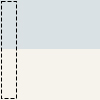
The second gradient is the vertical stripes running in the default direction.
Together
When you stack them as separate background layers and add a background-size:
You get:
- Layer 1: vertical 50/50 split
- Layer 2: horizontal 50/50 split